
Contact form spam can turn your submissions record into a trash can. Bots can submit hundreds of unwanted messages in a short time, so you should integrate proper spam protection into your contact form.
You can use a single strong spam protection method or combine several layers of protection when your site needs them.
In this guide, you’ll learn 8 practical ways to stop contact form spam in WordPress, including reCAPTCHA, Cloudflare Turnstile, honeypots, time-based protection, IP restrictions, field validation, rate limiting, and spam-pattern monitoring. You’ll also learn how to choose the right combination for your forms.
What Do You Consider Contact Form Spam?
Spam submissions are unwanted content submitted through a website’s form. In this case, through lead or contact forms. The submissions can come from automated spambots or people who manually use forms to send unsolicited messages.
Common examples include:
- Fake sales pitches
- SEO and link-building offers
- Phishing links
- Malicious URLs
- Repeated promotional messages
- Fake support requests
- Irrelevant advertisements
- Automated test submissions
- Messages designed to distribute unwanted content
Every spam submission behaves differently. A bot can send hundreds of requests quickly, while a human spammer may submit messages slowly enough to bypass basic automated checks.
That is why effective WordPress contact form spam protection usually involves more than one technique.
What Are Spambots?
Spambots are automated programs that interact with websites without a human controlling every submission.
A bot can discover a form, identify fields such as name, email, subject, and message, and automatically submit generated values. Some bots target forms at scale, while others use more specific rules.
Bot Spam vs. Human Spam
Different approaches work against different types of spam.
Bot spam comes from automated scripts. CAPTCHA alternatives, honeypots, time-based checks, tokens, and other automated controls can help identify or reject these submissions.
Human spam comes from someone who intentionally submits your form. A CAPTCHA may confirm that the visitor is human, but it cannot determine whether that human has a legitimate reason to contact you.
For human spam, keyword filtering, email blocklists, IP restrictions, country restrictions, and manual review of entries can provide additional protection.
Why Do Bots Target WordPress Contact Forms?
Contact forms provide a simple way to send data to a website. From a spammer’s perspective, that makes them useful targets.
A poorly protected form may accept submissions without checking whether the request came from a legitimate visitor. Bots can then repeatedly submit content without completing any meaningful verification.
Spammers target contact forms to promote products, generate leads, distribute malicious links, or trick businesses and visitors into fraudulent interactions. Other reasons include:
- Distribute malicious links
- Test whether a website accepts automated submissions
- Abuse email notification systems
- Generate large numbers of unwanted entries
- Reach businesses through contact channels
A high volume of unwanted submissions can also make genuine inquiries harder to identify and manage. The solution is to add controls at different stages of the submission process.
8 Methods to Stop Contact Form Spam in WordPress
You can’t block every type of contact form spam by configuring a single setting. Start with the spam protection your form plugin already provides, then add targeted controls based on the spam you’re actually receiving.
Here’s how to install Gutena Forms:
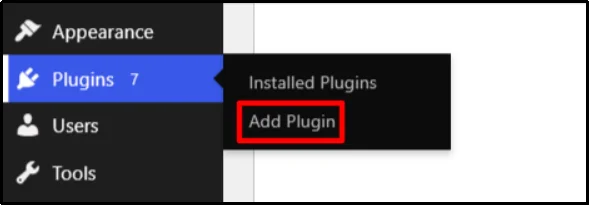
- Go to Plugins → Add Plugin.
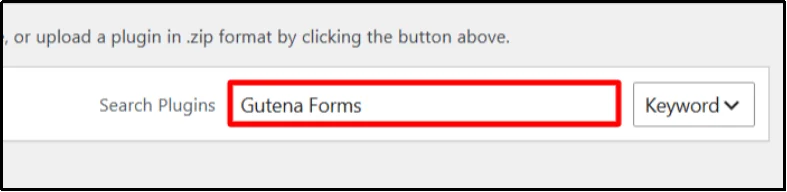
- Enter Gutena Forms in the search bar.
- Click on Install Now, then Activate.
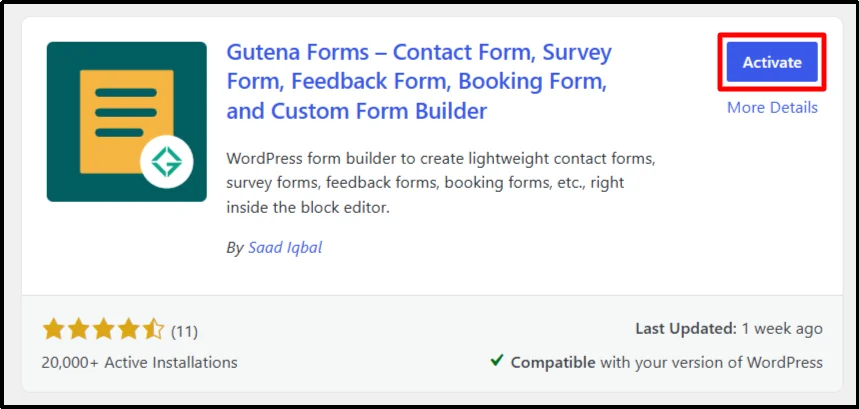
You have successfully installed and activated Gutena Forms.
Before configuring spam protection, create or open the contact form you want to protect. Gutena Forms lets you enable anti-spam protection for all forms through global settings or for individual forms in the WordPress Block Editor.
In the following methods, we’ll use the Global Settings because they let you configure spam protection for all your forms at once.
Method 1: Add Google reCAPTCHA to Your Contact Form
Google reCAPTCHA checks form activity to help distinguish legitimate visitors from automated requests. The exact verification experience depends on the reCAPTCHA version you use.
How to set it up:
- Create a reCAPTCHA site in Google’s reCAPTCHA console.
- Select the reCAPTCHA type you want to use.
Gutena Forms supports Google reCAPTCHA v2 and v3. Choose the version that best fits the user experience and spam protection needs of your form.
- Add your website domain.
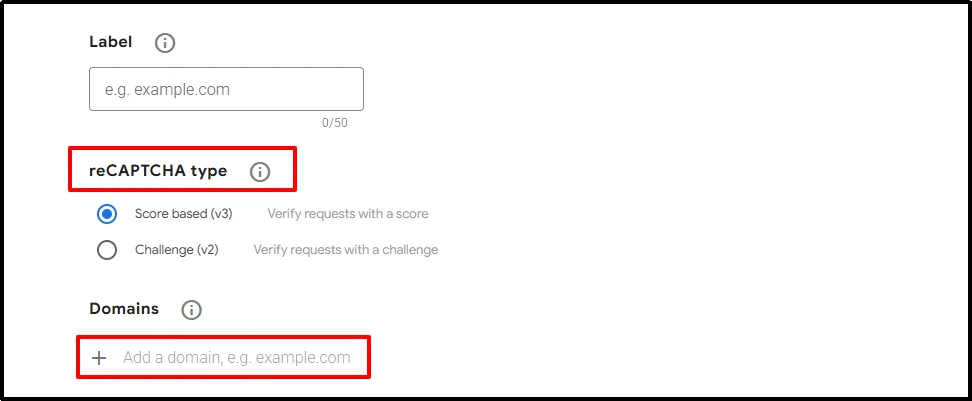
- Copy the generated Site Key and Secret Key.
- In your WordPress dashboard, go to Gutena Forms → Settings → Spam Protection → Google reCAPTCHA.
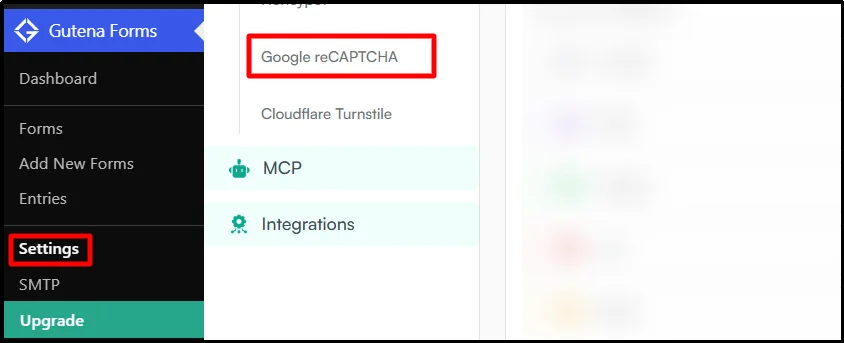
- Enable reCAPTCHA on the forms you want to protect.
- Add the two keys and save the settings.
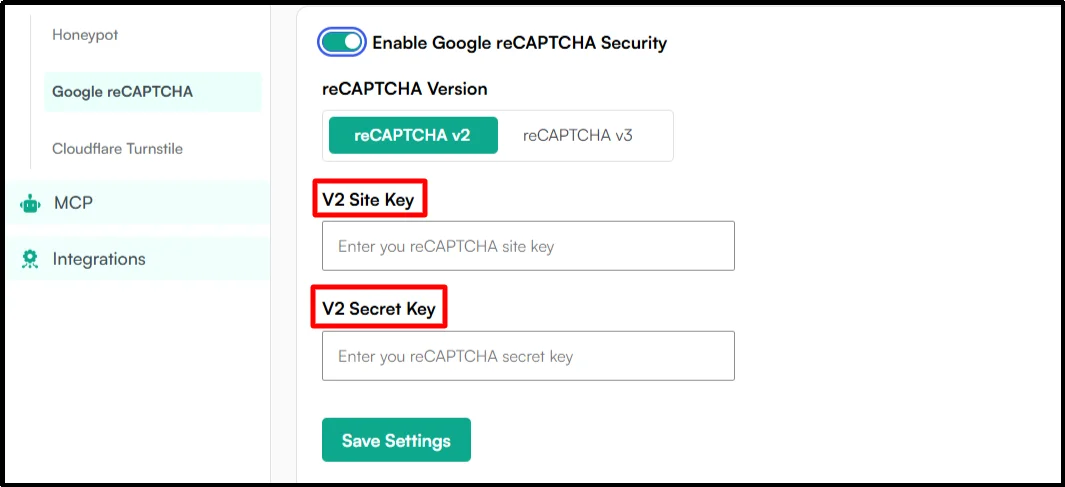
- Submit a test entry to confirm that the form works correctly.
Gutena Forms supports Google reCAPTCHA v2 and v3 for forms created with its Gutenberg Form Block. You can configure spam protection globally or enable it for individual forms in the WordPress Block Editor.
Method 2: Enable Cloudflare Turnstile for Low-Friction Protection
Cloudflare Turnstile helps detect automated form activity without requiring most visitors to complete a traditional CAPTCHA challenge. It offers Managed, Non-Interactive, and Invisible modes.
Managed mode is a good starting point for most sites because Cloudflare can decide when a visitor needs additional interaction.
How to set it up:
- Sign in to your Cloudflare account, open Turnstile, and click on Add Widget Manually.

- Enter your website domain. Select the widget mode you want to use.
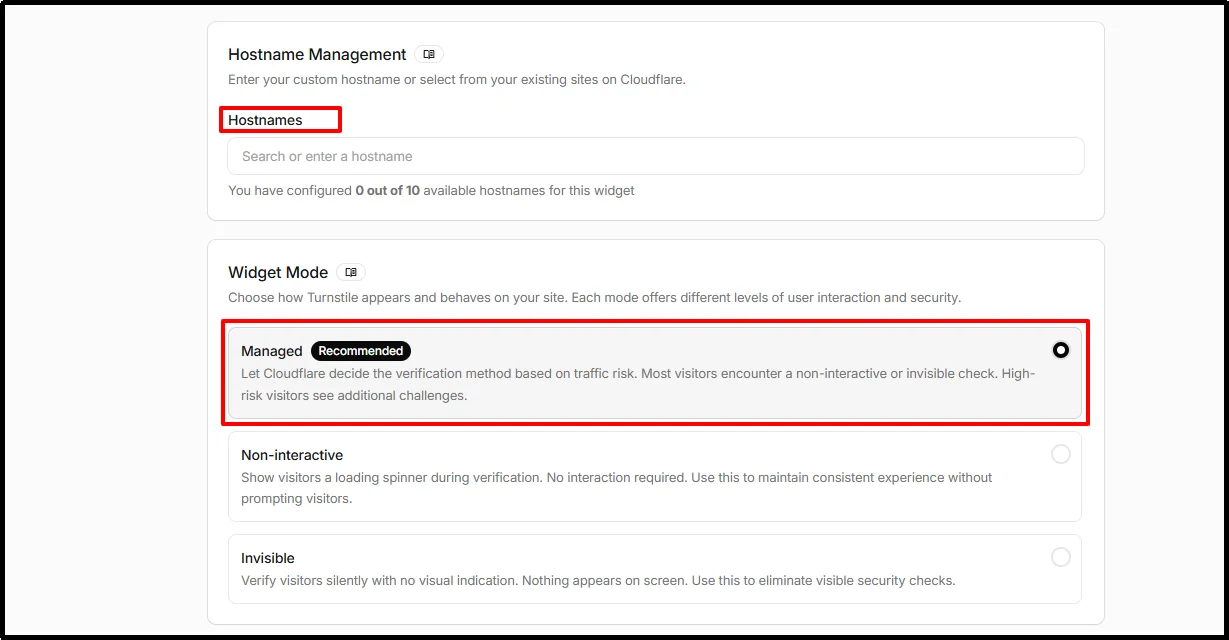
- Copy the Site Key and Secret Key.
- In your WordPress dashboard, go to Gutena Forms → Settings → Spam Protection → Cloudflare Turnstile.
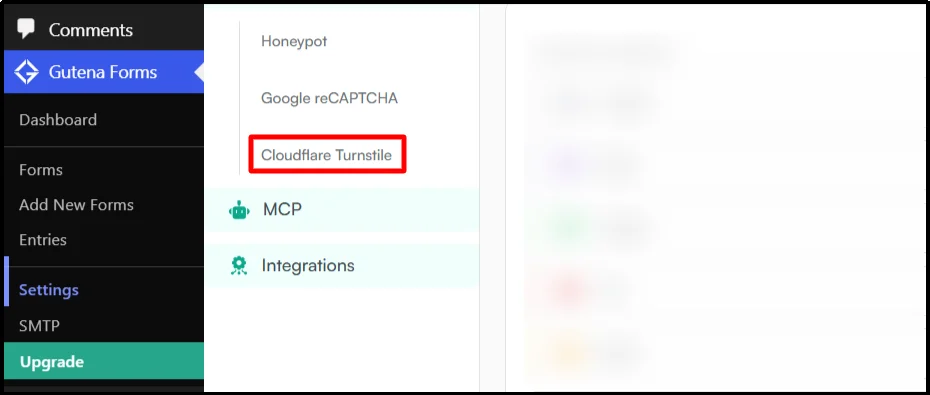
- Enable Turnstile on the form. Add both keys and save them.
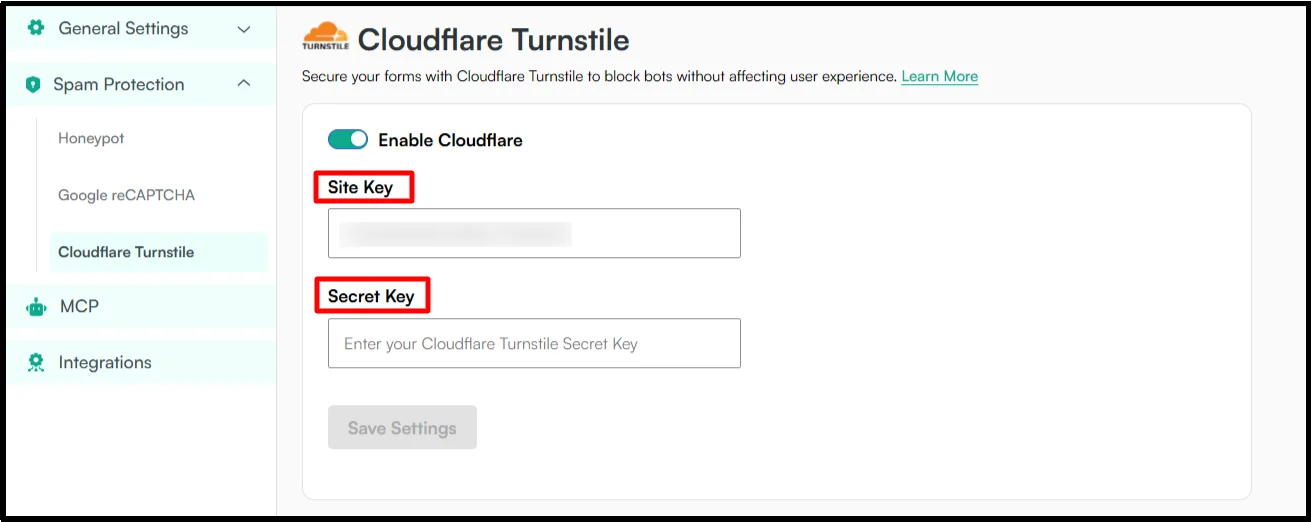
Gutena Forms supports Cloudflare Turnstile for forms created with its Gutenberg Form Block.
Method 3: Add a Honeypot Field to Trap Bots
A honeypot uses a hidden field that normal visitors should leave empty. Basic spambots may automatically fill the field, allowing the form to identify the submission as suspicious.
How to set it up:
- In your WordPress dashboard, go to Gutena Forms → Settings → Spam Protection → Honeypot.
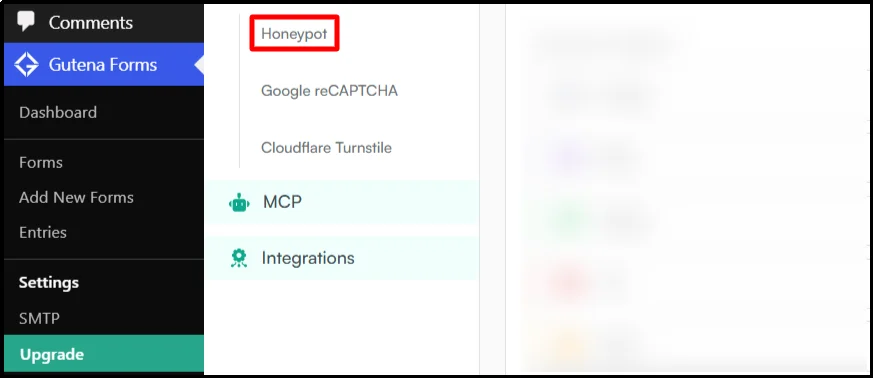
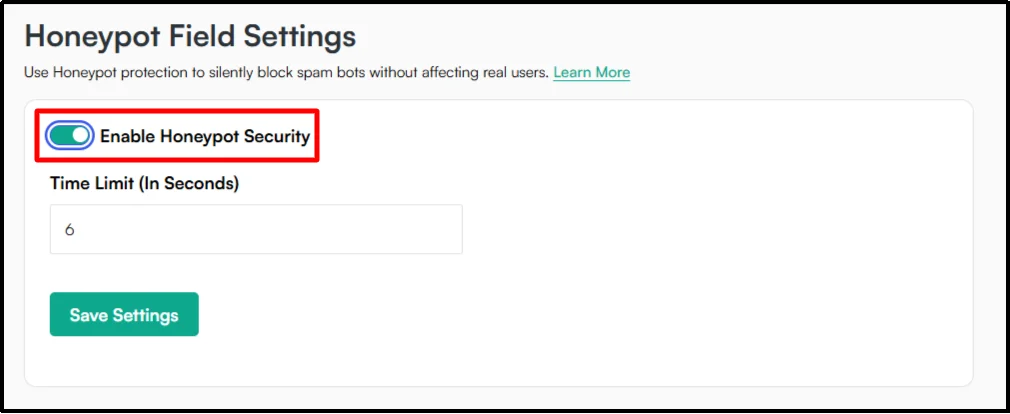
- Enable the honeypot option.
- Save the form.
Avoid creating your own hidden field unless your form plugin specifically supports honeypot validation. A poorly implemented hidden field can affect accessibility or legitimate submissions.
Method 4: Use Time-Based Protection to Catch Automated Submissions
Time-based protection checks how quickly someone submits a form after loading it. Extremely fast submissions can indicate automated activity.
How to use it:
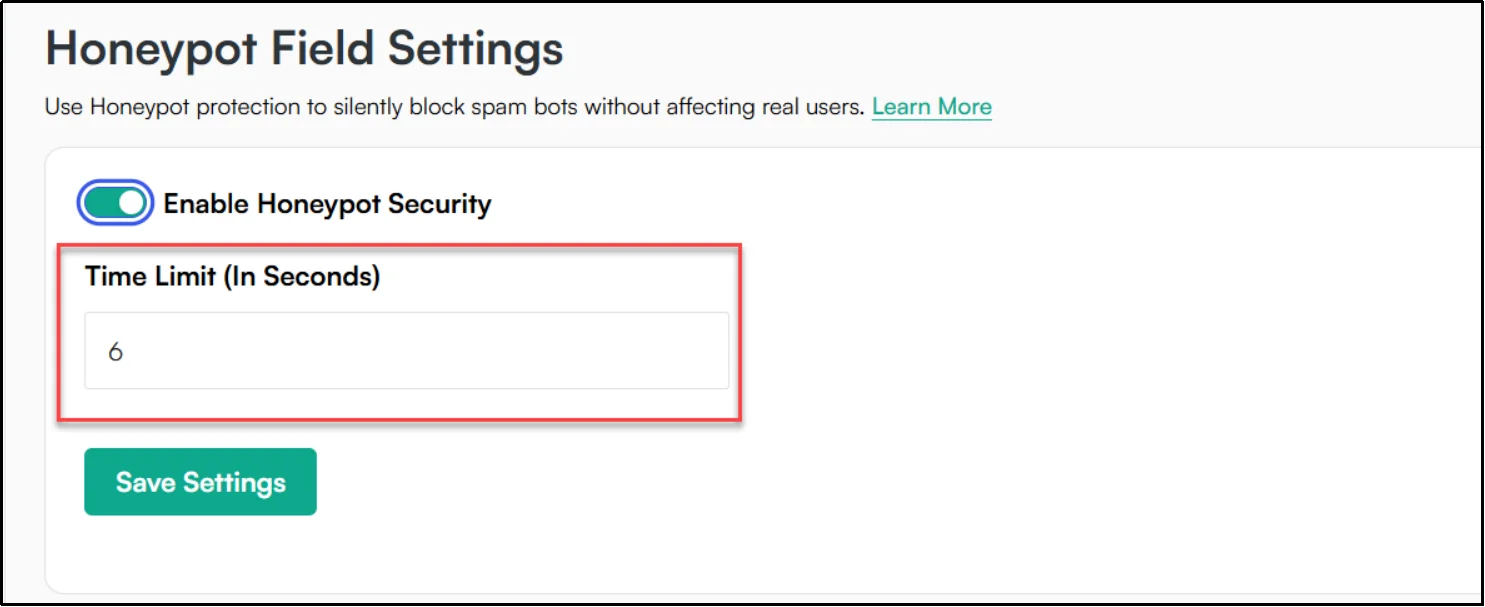
- Set a reasonable minimum submission time using the Time Limit option included with Gutena Forms’ Honeypot protection.
- Test the form yourself.
Don’t treat a fast submission as automatic proof of spam. Some real visitors can complete short forms quickly.
Method 5: Block Spam IP Addresses
If you identify repeated abuse from specific IP addresses or traffic sources, a firewall or security tool can block those requests.
How to use IP blocking:
- Open your security plugin or firewall’s IP blocking settings.
- Review your form entries or security logs. Identify repeated spam from the same IP address and confirm that the traffic is actually unwanted.
- Add the IP address to your firewall or security tool’s block list.
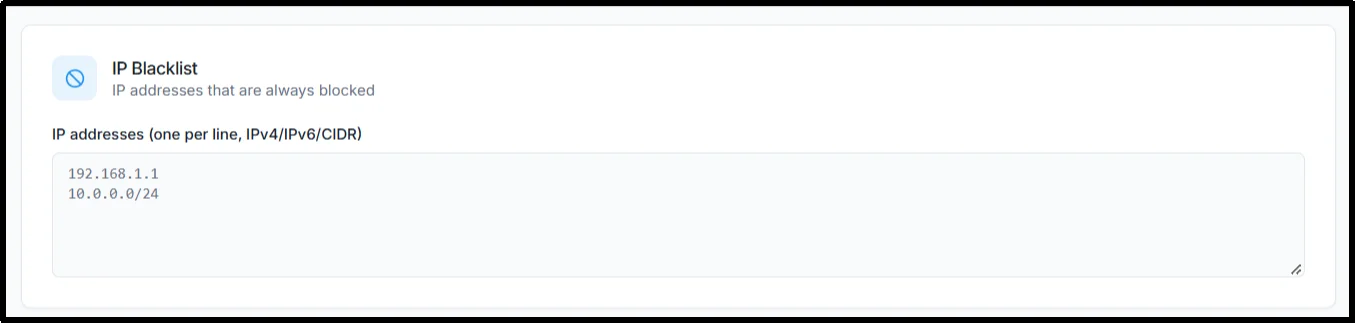
- Save the rule.
Don’t block broad IP ranges without a clear reason. Shared networks and changing IP addresses can cause aggressive blocking to cut off legitimate visitors.
Method 6: Use Field Validation to Block Invalid Submissions
Field validation checks whether submitted data follows the format your form expects. It can reject missing, malformed, or invalid values before they enter your workflow, but it does not replace dedicated spam protection.
Field validation checks whether submitted data follows the format your form expects. It can reject missing, malformed, or invalid values before they enter your workflow, but it does not replace dedicated spam protection.
How to use it:
- Identify which fields receive invalid data.
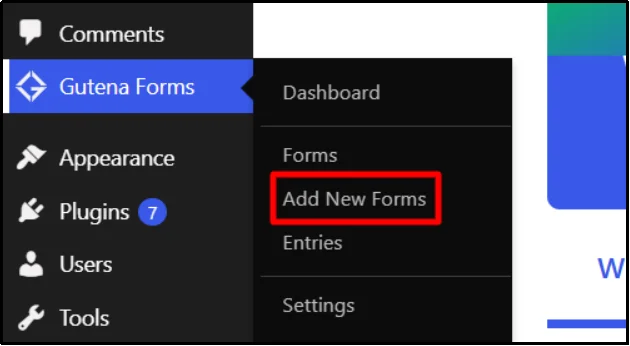
- Go to Gutena Forms → Add New Form.
- Select the respective form field.
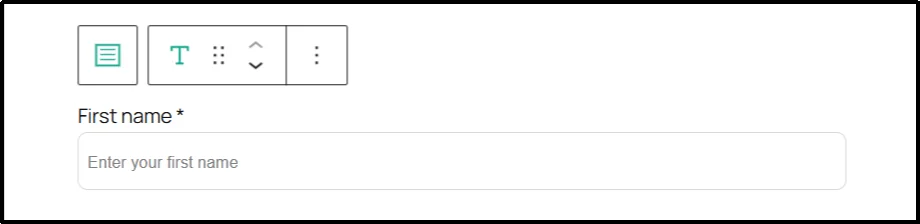
- The right sidebar will open. Tick the Required option when you need the field. You can also limit the maximum number of characters.
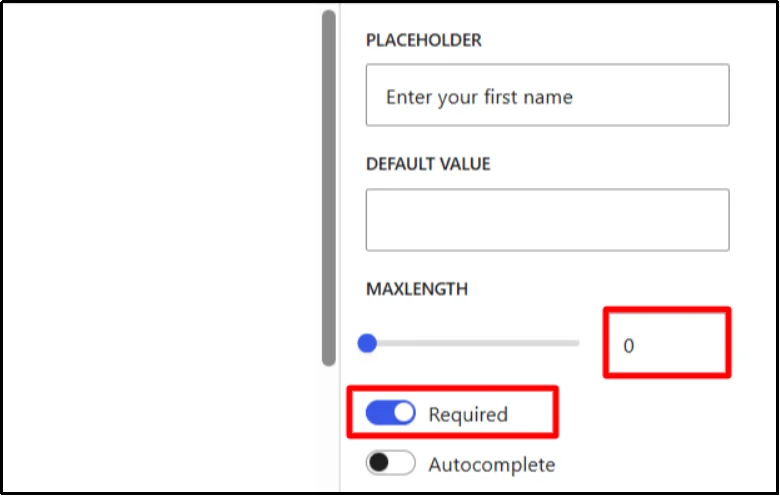
- Test valid and invalid submissions.
- Review blocked submissions for false positives.
Validation helps maintain data quality, but it doesn’t replace dedicated anti-spam protection.
Method 7: Use Rate Limiting to Limit Repeated Submissions
Rate limiting can restrict how frequently a visitor, IP address, or other source can submit a form.
How to use it:
- Check whether your form plugin, security plugin, firewall, or hosting environment supports rate limiting.
- Identify how frequently spam submissions occur.
- Set a reasonable submission limit based on your site’s traffic and spam patterns.
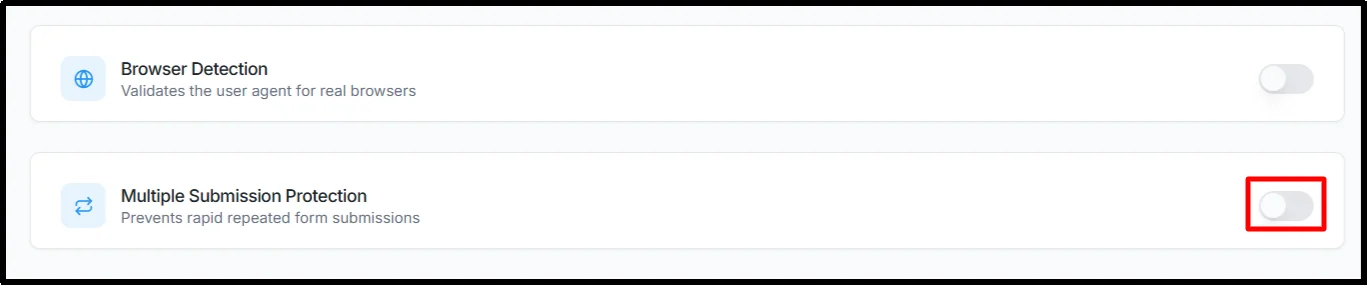
- Apply the limit to the affected form or traffic source, depending on the tool you’re using.
- Test repeated submissions.
The exact settings depend on the tool providing the rate-limiting feature.
Method 8: Save Form Entries and Review Spam Patterns
Keeping form entries gives you useful information about the type of spam reaching your website. You can use those patterns to decide which protection to add next.
How to review spam:
- For Gutena Forms, go to Gutena Form → Entries.
- Filter entries by Status, Tags, Date and Time, etc.
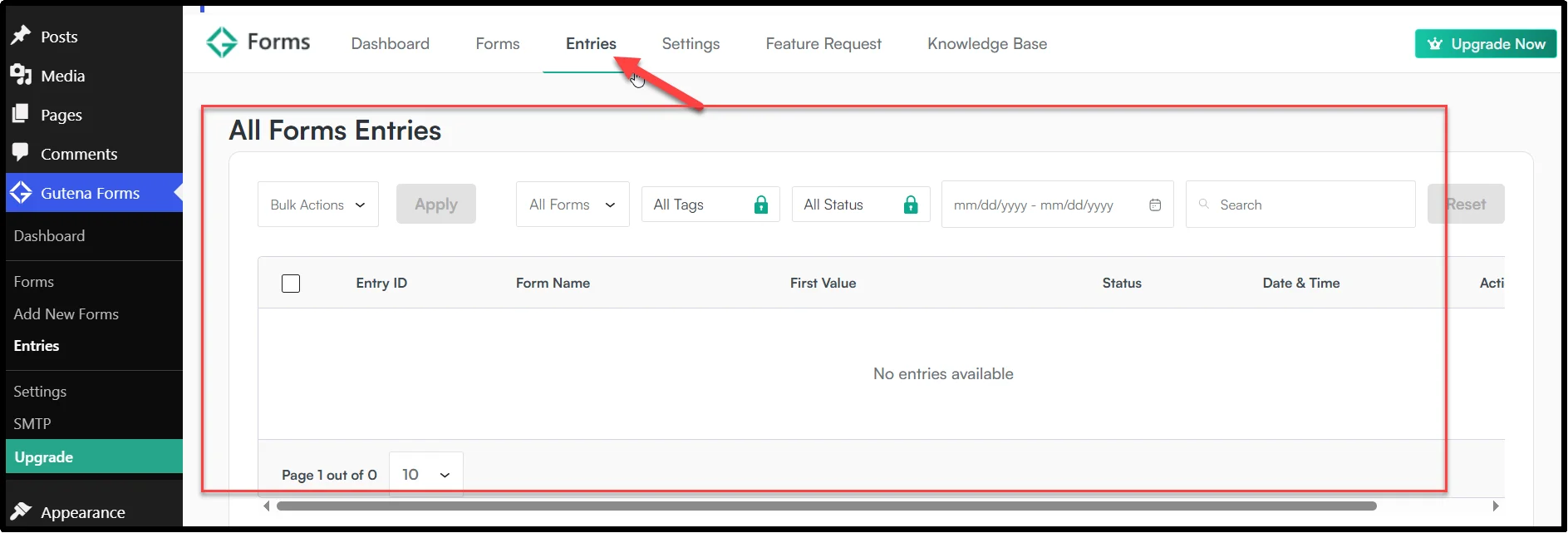
- Look for repeated messages, URLs, email addresses, or unusual patterns.
- Tag or mark suspicious entries where available.
- Identify patterns shared across multiple submissions.
- Use those patterns to refine your anti-spam controls.
Gutena Forms includes a Form Entries Database, Entries Dashboard, Advanced Entry Filters, and Tags & Status Management to help you organize and review submissions.
Bonus: Make Sure Real Form Emails Don’t Land in Spam
Stopping form spam and improving email deliverability are two different jobs.
Your anti-spam system determines whether to accept a visitor’s submission.
Your email configuration determines whether the resulting notification reaches the recipient.
If legitimate contact form submissions arrive in your WordPress entries but the notification emails never reach your inbox, the form itself may not be the problem.
Check your WordPress email configuration, From address, SMTP setup, SPF, DKIM, and DMARC records to improve email deliverability.
This gives you two separate protection layers:
Form spam protection: Reduce unwanted submissions.
Email deliverability: Improve the chances that legitimate notifications reach the inbox.
You can also use Post SMTP’s Spam Score Checker to review your DNS and email authentication setup and identify issues that may affect deliverability.
Which Spam Protection Method Should You Choose?
The best approach depends on the spam pattern you’re seeing. Start with the least disruptive protection that fits your form, monitor your entries, and add another layer only when you need it. This helps reduce spam without creating unnecessary friction for legitimate visitors.
| Problem | Useful protection |
| Automated bot submissions | Honeypot, reCAPTCHA, Turnstile |
| Bots submitting forms instantly | Time-based protection |
| Repeated submissions | Rate limiting |
| Repeated spam from specific sources | IP restrictions |
| Invalid or malformed data | Field validation |
| Unclear spam patterns | Entry monitoring and review |
For a typical WordPress contact form, you don’t need to activate every possible method immediately.
A sensible starting combination is:

Honeypot + Cloudflare Turnstile or reCAPTCHA + sensible field validation
If spam continues, review your form entries to identify the pattern. You can then add rate limiting or IP restrictions where appropriate.
That approach keeps the form experience reasonable while giving you a clear path to address new spam patterns.
Protect Your WordPress Contact Forms with Gutena Forms
Contact form spam usually takes more than one tactic to control. Start with the protection your form plugin provides, then add layers like honeypots, reCAPTCHA, Cloudflare Turnstile, validation rules, and submission limits as needed. Monitor your entries so you can spot new spam patterns and adjust your protection over time.
If you want a Gutenberg-native way to build and protect WordPress forms, Gutena Forms combines form building with built-in Google reCAPTCHA, Cloudflare Turnstile, and Honeypot protection, along with form entries, email notifications, and other submission-management tools.
Ready to reduce unwanted submissions on your contact forms? Try Gutena Forms and build your next WordPress contact form with spam protection built into your workflow.
Frequently Asked Questions
Why Is My WordPress Contact Form Getting Spam?
Spambots can automatically submit public forms, while human spammers can submit messages manually. Honeypots, Turnstile, reCAPTCHA, rate limits, and content filters can reduce these submissions.
Can You Stop Contact Form Spam Without CAPTCHA?
Yes. Honeypots, time-based checks, rate limiting, IP restrictions, field validation, and server-side spam filtering can reduce spam without using a visible CAPTCHA. No single method blocks every type of spam, so you may need to combine multiple controls.
Is Cloudflare Turnstile Better Than reCAPTCHA for WordPress Forms?
Both can help reduce automated form submissions, but they work differently. Turnstile offers Managed, Non-Interactive, and Invisible modes, while Gutena Forms supports Google reCAPTCHA v2 and v3. Choose based on the user experience, integration options, and privacy requirements of your site.
Does Gutena Forms Have Built-In Spam Protection?
Yes. Gutena Forms supports Google reCAPTCHA v2 and v3, Cloudflare Turnstile, and Honeypot protection through its Gutenberg Form Block.
Can a Honeypot Stop All Contact Form Spam?
No. Some sophisticated bots can detect and avoid honeypot fields. Combining a honeypot with Turnstile or reCAPTCHA provides broader protection.
Should I Use More Than One Spam Protection Method?
Often, yes. Combining methods can address different spam patterns. For example, use a honeypot for simple bots, then add Turnstile or rate limiting for extra protection.
Does Blocking an IP Address Stop Contact Form Spam?
It can block submissions from a specific IP, but spammers can change addresses or use proxies. Treat IP blocking as one layer, not your only spam protection.
Can Contact Form Spam Affect Email Deliverability?
Yes, indirectly. Spam submissions can generate large volumes of notification emails. However, spam protection filters submissions, while email authentication and SMTP configuration help legitimate emails reach their destination.
How Do I Know Which Spam Protection Method My Form Needs?
Start with the spam pattern. Fast submissions may need time-based checks, automated field completion may call for a honeypot or bot verification, and repeated requests may require rate limiting or IP restrictions.
Can WordPress Contact Form Spam Be Prevented Completely?
No. You cannot guarantee that every spam submission will be blocked. Different bots and human spammers use different tactics, so a layered approach using honeypots, bot detection, rate limiting, validation, and regular monitoring provides stronger protection.